
 Home
Home  Apps
Apps  Games
Games  Windows
  Terms of Service
  Cookies & Privacy Policy
  About us
Brewfather
Version: 2.20.2
Developer: Warpkode AS
 Verified App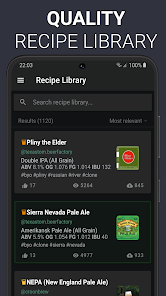
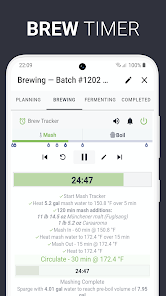
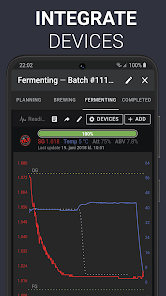
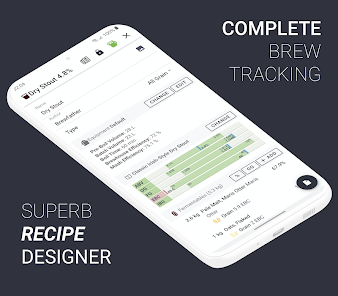
Brewfather is a powerful brewing software designed for homebrewers and professionals alike. It offers an intuitive interface for recipe creation, batch tracking, and ingredient management, making the brewing process seamless and enjoyable. With features like cloud syncing, advanced calculations, and a comprehensive database of ingredients, Brewfather helps brewers of all levels optimize their craft. Whether you're brewing beer, cider, or mead, Brewfather is your go-to companion for achieving consistent and high-quality results.
Features & Highlights
Brewfather stands out in the crowded world of brewing apps by offering a comprehensive suite of features that cater to both novice and experienced brewers. Here are some of the standout features that I found particularly useful:
Real Experience Using Brewfather
Application Scenarios
As an avid homebrewer, Brewfather has seamlessly integrated itself into my brewing routines. I typically start my brewing weekends by browsing through the app to either select an existing recipe or create something new. The intuitive interface makes it easy to find inspiration, whether I’m looking for a light summer ale or a robust stout. Once I settle on a recipe, I can easily adjust the ingredients based on what I have available. Brewfather becomes my brewing companion as I prep my ingredients, and I often refer back to the app to check the specific gravity readings during fermentation. It’s also invaluable when I’m sharing my brewing experiences with friends; I can pull up my notes and recipe at a moment’s notice to discuss what’s working well and what I might change next time.
User Experience
The user interface of Brewfather is sleek and modern, making navigation a breeze. Upon opening the app, I’m greeted with a dashboard that gives me a quick overview of my brewing schedule and any active batches. The workflow is logical—creating a recipe only takes a few taps, and the app guides you through the necessary steps without overwhelming you. Performance-wise, I’ve never encountered lag or crashes, which is crucial when I’m mid-brew and need quick access to my recipe. What I appreciate most is the attention to detail; for instance, the app includes helpful tips and definitions for brewing terms, which is great for newer brewers. Overall, my experience has been overwhelmingly positive, and Brewfather has become an essential tool in my brewing arsenal.
Pricing
Brewfather operates on a freemium model, which means you can access a basic version for free, but advanced features require a subscription. The premium plan is reasonably priced, especially considering the wealth of features it unlocks. I’ve found that the investment is well worth it for the convenience and functionality it offers, particularly for someone like me who brews regularly. The ability to track multiple batches and access all the calculators makes it a valuable tool that justifies the cost.
Updates & Support
The developers of Brewfather are quite responsive, regularly rolling out updates that add new features and address bugs. I’ve noticed improvements in the app’s speed and usability with each update. Additionally, the support team is approachable and helpful; I had a query about syncing my data across devices, and they responded promptly with a clear solution. Their commitment to enhancing user experience is evident, and it's reassuring to know that they value their community of brewers.
Security & Privacy Review
From a security perspective, using Brewfather gives me peace of mind. The app is available on both the App Store and Google Play, which means it undergoes necessary vetting processes to ensure user safety. When registering, I found that Brewfather requires minimal personal information, which is a relief in an age of data breaches. There are no ads cluttering the user interface, and I appreciate that the app does not engage in invasive tracking behavior. My brewing data feels secure, and I have control over what I choose to share. Overall, Brewfather respects user privacy, allowing me to focus on what I love—brewing great beer—without any worries about my personal information being compromised.
Pros 
-
 Brewfather is your ultimate brewing companion!
 - Seamlessly track your recipes!
- Advanced tools for precise brewing!
- Sync data across multiple devices!
- Join a community of passionate brewers!
- Customizable dashboards for insights!
Cons 
-
 Limited customization options
 - Complex interface for beginners
- Requires a subscription for full features
- Occasional syncing issues reported
Get Installation Details  Google Play
  App Store
Google Play App Store FAQ
1
Can I submit suggestions or feedback to Brewfather?
Yes, Brewfather encourages user feedback and suggestions through their support channels and community forums.
2
Does Brewfather collect my personal data?
Brewfather collects minimal personal data, primarily for account management and user experience improvements, following privacy regulations.
3
Does Brewfather support offline use?
Yes, Brewfather allows offline access, enabling users to view and manage their recipes even without an internet connection.
4
How do I cancel my Brewfather subscription?
You can cancel your Brewfather subscription through your account settings in the app or the website.
5
How much does a subscription to Brewfather cost?
A Brewfather subscription typically costs around $30 per year, providing access to premium features and updates.
How to use Brewfather
1
Can I change my Brewfather account email?
Yes, go to your account settings in the app or website to update your email address.
2
How can I contact Brewfather customer service?
You can reach Brewfather customer service through their support email at support
3
How do I delete my Brewfather account?
To delete your account, contact Brewfather support through email and request account deletion.
4
How do I log in to my Brewfather account?
To log in, visit the Brewfather website or app, enter your email and password, then click the login button.
5
Is there an activation process for Brewfather?
Brewfather does not require activation; simply create an account to start using the app immediately.
Top Apps















Similar Apps

7-Eleven
7-Eleven, Inc.

4.4

Chipotle - Fresh Food Fast
Chipotle Mexican Grill
4.6

Grubhub: Food Delivery
Grubhub
4.5

Jersey Mike's
Jersey Mike's Subs
4.8

Wingstop
Wingstop Restaurants, Incorporated
4.8

Buffalo Wild Wings
Buffalo Wild Wings, Inc.
4.5

Jack in the Box
Jack in the Box Inc.
2.6

Uncle Julio's
Thanx
3.2

sweetFrog®
Kahala
3.7
Stay Hydrated
The App Dynamics

Rafeeq: Food Delivery in Qatar
Rafeeq
4.3

Pick Up Limes
Pick Up Limes
5


