Category: Travel
Developer: Disney
 Verified App


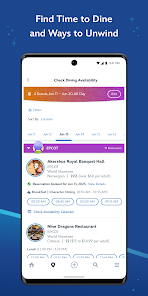
Features & Highlights
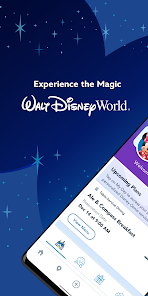
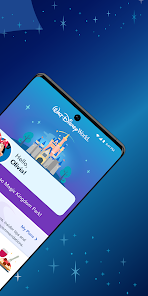
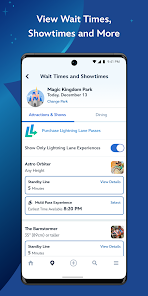
The My Disney Experience app is a powerhouse for anyone planning a trip to Walt Disney World. It seamlessly integrates various functionalities to enhance your visit, making it easy to navigate the magic of Disney. Here are some of the standout features:
Real Experience Using My Disney Experience
Application Scenarios
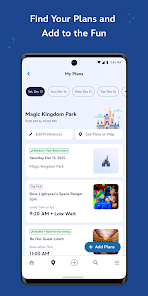
During my recent trip to Disney World, My Disney Experience became my trusty sidekick. From the moment I arrived, I relied on the app to guide my adventures. Upon entering the park, I immediately accessed the park reservation feature to confirm my entry into Magic Kingdom. No waiting in lines or fumbling with paper tickets; everything was neatly organized in the app.
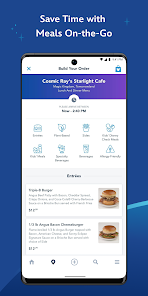
As the day progressed, hunger struck, and I was able to use the mobile food ordering feature to grab a quick lunch at Cosmic Ray’s Starlight Café. I ordered my food while enjoying a ride on the PeopleMover, and by the time I got off, my meal was ready for pickup. It felt like I had mastered the park experience!
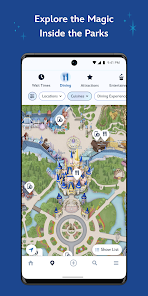
When it was time to meet up with friends, the interactive map helped me navigate the bustling park and find them without a hitch. I even used the Disney Genie service to plan our next few hours, ensuring we hit all the must-see attractions without wasting time.
User Experience
The user interface of My Disney Experience is intuitive and user-friendly, which made navigation a breeze. The layout is clean, with clearly labeled sections that guide you through park reservations, dining options, and ride wait times. I was particularly impressed by how quickly the app updated information. It felt like a live connection to the park, providing real-time data that enhanced my experience.
Performance-wise, the app was mostly smooth, although there were occasional lag times, especially during peak hours when the park was crowded. However, these minor hiccups didn’t detract from my overall experience. I left the parks each day feeling accomplished, having used the app to maximize every moment.
Pricing
My Disney Experience is free to download and use, which is a major plus for budget-conscious travelers. However, keep in mind that while the app itself is free, experiences within the parks, such as dining reservations and certain attractions, may come at a cost. It’s essential to budget for your trip, but the app helps you plan effectively to make the most of your investment.
Updates & Support
Disney consistently updates the My Disney Experience app to improve functionality and user experience. I’ve noticed enhancements in the interactive map and the overall speed of the app since my last visit. Disney also offers robust support through the app itself, with helpful FAQs and a customer service chat feature. It’s reassuring to know that assistance is just a tap away if you encounter any issues during your visit.
Security & Privacy Review
When using the My Disney Experience app, security and privacy are valid concerns for many users. The app is available on both the App Store and Google Play, ensuring that it meets standard security protocols for app distribution. During the registration process, I was asked to provide personal information, including my name, email, and credit card details for reservations. While this is standard for such applications, it’s essential for users to be mindful of sharing their data.
In terms of advertising and tracking, My Disney Experience does not bombard users with intrusive ads. However, it does collect data on user preferences and behavior to enhance your experience, which is a common practice among apps today. Overall, I felt that Disney has taken necessary steps to protect user data while still providing a personalized experience.

 Plan and manage your Disney trip conveniently from your mobile device. Access real-time wait times for attractions to optimize your park experience. Make and modify dining reservations effortlessly for your favorite restaurants. Enjoy personalized itineraries tailored to your interests and preferences. Share plans and experiences with family and friends seamlessly in-app.
 Limited functionality can lead to frustration for users seeking a seamless experience. Frequent app glitches disrupt planning and can cause missed reservations. Navigation can be confusing, making it hard to find essential features quickly.

The payment process is incredibly frustrating and flawed, from a user-experience perspective. I was trying to buy a Lightning Lane pass and apparently you can *only* do that in the app. When I was trying to enter my credit card info, if I accidentally mis-clicked then the form would close and I'd have to re-enter it again. Your cart would time out *as* you are filling out payment info and you'd have to start over. It would inexplicably fail and I'd have to start over, many times. So annoying.
It is overwhelming to tackle the trip to Disney. At first, the app felt like another complication, but once you get the hang of it, it makes the whole thing so much easier. It is literally your whole.itinerary, with information and updates about every park, ride, and restaurant. I also found it a helpful way to communicate with cast members. When I didn't know exactly what to ask or how to find something, they showed me right in the app. They are masters at using it and are happy to share!
New phone new issues. Android 14. It connects the magic band plus but only gives errors when trying to update. Nothing ever just works. It's nice when it works, but sometimes twice a day I had to uninstall and reinstall it because it wouldn't link up my resort to my account in a way I could interact with. Instead it would ask for my confirmation number, tell me it was already linked, but not give me access.
difficult to navigate but works. finding what you need is complicated with multiple possible locations in the app and complex buried menus. inconsistent labels also complicate matters. for example finding the fireworks packages is a struggle. locating restaurants with Open slots is time consuming and cumbersome. the restaurants require a fee for reservations, but then aren't ready at the set time. everything loads slowly when it doesn't time out. resort feature and functions seem pasted on.
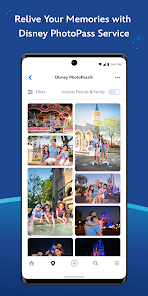
Not only have I been having issues getting photos using Bluetooth for a while now, but now, all of a sudden and for literally no reason, I'm getting signed out of the app as well at the most inopportune and annoying times. Never used to have this problem, but now the app randomly does this. Really hoping they fix this glitch.
Review Source: Google Play store public user reviews.
Yes, users can submit suggestions or feedback through the app's support section or contact Disney customer service for assistance.
Yes, My Disney Experience collects personal data, including user profiles, preferences, and location information, to provide personalized experiences and services.
While some features can be accessed offline, such as viewing park maps and previously loaded information, an internet connection is required for real-time updates and most functionalities.
Since My Disney Experience does not have a subscription model, there is no need to cancel; users can simply stop using the app whenever they wish.
There is no subscription fee for using My Disney Experience; it is completely free to use, but users may incur charges for park tickets and other services.
Yes, you can email customer service through the contact form on the My Disney Experience website for assistance.
Yes, the My Disney Experience app offers customer service support through the "Help" section for quick assistance.
To activate your account, visit the My Disney Experience website and follow the prompts to enter your details.
To change your login information, log into your My Disney Experience account and go to the account settings to update your email or password.
You can reach customer service by calling the number provided on the My Disney Experience website or through the app's help section.
We’ve made general app improvements to help you discover more magic around Walt Disney World Resort.











 Google Play
  App Store