Category: Auto & Vehicles
Developer: FIXD
 Verified App


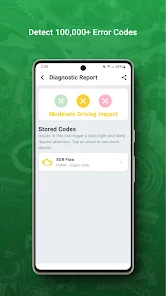
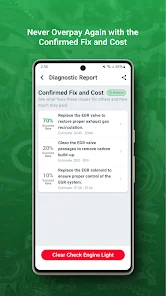
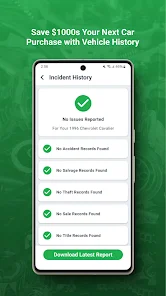
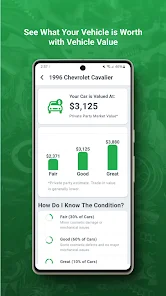
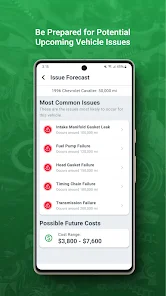
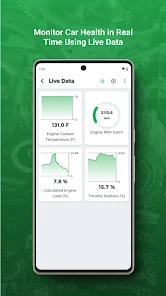
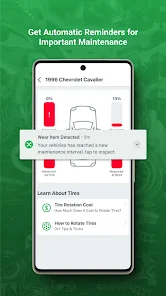
The FIXD app is designed to help you better understand your car and provide helpful maintenance tips. It does this by plugging into your car's OBD-II port (this is typically located under the dash) and then syncing with your smartphone.Once the app is up and running, it will provide you with real-time data about your car's performance, as well as diagnostic trouble codes if something isn't working properly. The app also offers maintenance reminders based on your driving habits and can even tell you how much fuel you have left in the tank! Overall, the FIXD app is a helpful tool that can be used by anyone, regardless of their automotive knowledge. Whether you're looking to keep tabs on your car's health or simply want to be more informed about what's going on under the hood, FIXD is definitely worth checking out.
Features & Highlights
When I first started using the FIXD app, I was immediately impressed by its robust features designed for both novice and experienced car owners. The app stands out in the crowded automotive diagnostics market for several reasons:
Real Experience Using FIXD
Application Scenarios
My experience with the FIXD app has been nothing short of transformative. Just last month, I was on a road trip when my car suddenly began to sputter and the check engine light flickered ominously. Panic set in, but I quickly remembered my FIXD device tucked away in my glove compartment. I pulled over, connected it to the OBD-II port, and within seconds, the app alerted me to a misfire in one of the cylinders. This real-time diagnosis allowed me to assess whether I could continue my journey or if I needed to seek help. Thanks to FIXD, I was able to find a nearby mechanic who confirmed the issue and got me back on the road without major delays.
User Experience
Navigating the FIXD app is a breeze. The user interface is clean and intuitive, which is a breath of fresh air in the tech world, particularly for automotive apps that can often be overly complicated. The home screen displays all the essential diagnostic information prominently, making it easy to access whatever I need. I found the workflow seamless; from diagnosing an issue to viewing maintenance reminders, everything is just a few taps away. The performance is swift; I have never experienced lag or crashes, even when using the app simultaneously with other applications on my phone. Overall, FIXD has not only simplified my car care routine but has also empowered me with the knowledge I need to make informed decisions about my vehicle.
Pricing
FIXD offers a free version that comes with basic features, but to unlock its full potential, there’s a subscription plan available. The premium version, which I opted for, costs around $6.99 per month or $49.99 annually. Given the money I’ve potentially saved on diagnostic bills and the invaluable maintenance reminders, I found the price to be quite reasonable. The subscription also grants me access to additional features, including enhanced vehicle history tracking and more detailed repair cost estimates.
Updates & Support
FIXD consistently rolls out updates, which I appreciate as it shows their commitment to improving user experience. I recently noticed new features that enhanced the user interface, making it even easier to navigate. Customer support is also commendable; I had a minor issue with the app syncing with my vehicle, and I reached out to their support team. They responded promptly and provided a clear solution, ensuring that my experience remained positive.
Security & Privacy Review
As an American user, I prioritize security and privacy, especially when it comes to apps that handle personal and vehicle information. FIXD is available on both the App Store and Google Play, which are reputable sources known for their security protocols. During registration, FIXD requires basic personal information, such as your name and email, but they assure users that this data is protected and not sold to third parties.
One concern I initially had was about ads and tracking behavior. Fortunately, the FIXD app is free of intrusive ads, which makes for a more enjoyable user experience. They do use some tracking to improve app functionality and user experience, but I found their privacy policy transparent and reassuring. Overall, my experience with FIXD has been secure, and I feel confident using the app knowing my data is handled with care.

 User-friendly interface simplifies vehicle diagnostics for everyone. Real-time data access helps monitor vehicle health effectively. Comprehensive reports identify issues before they escalate, saving money. Supports multiple vehicles, making it versatile for families or businesses. Regular software updates ensure you stay current with automotive technology.
 Limited compatibility with older vehicle models may restrict usability. Subscription fees for advanced features can add ongoing costs. Lack of real-time data monitoring limits diagnostic effectiveness during driving.

Absolute piece of trash. My vehicles dash board resembled a Christmas Tree with as many lights as it had activated (6 to be exact) ABS, AWD, VSC, BRAKE SYSTEM, SERVICE ENGINE. And one more. Yet this product said 'No Issues Detected' No matter how many times I scanned. App was up to date and everything else was operational (it connected to the device without any issues) So, save your money for something that actually works. I ended up getting a $30 device that did the job.
bad customer service. cancelled but they still took 100 bucks out of my account. I immediately called emailed you name it. emailed there customer service , Google play, my bank, its been almost a month and I still haven't gotten. my money back . I called right away as soon as I saw the charge go through. like hey hello no no. I dont want that. should have been a simple fix and refund. now all my bills are screwed who has a extra 100 to just burn or come up missing. its messed up.
I bought the device and didn't quite get what I was looking for in the device. I decided to cancel the 7 day trial period. At the trial period ended, I was charged for the subscription. I reached out to customer service via email and response was instantaneous. We had a dialogue and in a few days the refund hit my account. No complaints here. Not sure what was different based on the other feedbacks but I think FixD did a swell job supporting me.
I honestly thought this was going to be great. Got 2 code readers on a deal, and a trial of the premium app. 1st car I try it on, neither sensor will read. (Mind you, I have another code reader and it works just fine). Second car I try them on, the app shows a CEL and a major trouble code, and yet, the CEL isn't even on AND on scanning with another reader, it shows NO codes. I'm pretty sure it's all a bid to get you to upgrade to the premium app by scaring you into thinking you have a problem.
i followed all the steps and the scanner went through two full scans of my engine and transmission only to tell me my car wasnt responding to it. I tried u installing the app and also tried it other days but it still did the same thing. I decided to just buy a code reader and try that and it worked immediately. I reccomend getting the OBD2 for $45. Faster and straightforward, but more expensive.
Review Source: Google Play store public user reviews.
Yes, users can submit suggestions or feedback directly through the app or via their official website to help improve the service.
FIXD OBD2 Scanner adheres to privacy standards and collects minimal personal data necessary for its services; users can review the privacy policy for detailed information.
FIXD OBD2 Scanner primarily requires an internet connection for full functionality, but some basic features may be accessible offline.
To cancel your FIXD OBD2 Scanner subscription, you can do so through your app store account settings, following the cancellation process outlined there.
Subscription costs for FIXD OBD2 Scanner may vary depending on the plan chosen, typically offering monthly or annual options, so users should check the app for the latest pricing.
Yes, you can log in to your FIXD account from multiple devices as long as you use the same credentials.
To activate your account, download the FIXD app, create an account, and follow the prompts to complete the activation process.
You can contact customer service through the support section of our website or by calling the number listed on your user manual.
To update your customer number, please contact customer service with your old and new information for assistance.
To log in, open the FIXD app and enter your registered email and password. If you have trouble, use the "Forgot Password" option.
🔔 New CES alert details with map, metrics, and timeline📊 Redesigned Issue Forecast with clearer status and progress bars🔧 Prompt to update firmware when your sensor is too old to scan🔧 Refreshed alerts and trips screens🐜 Fixed mileage unit using FIXD country instead of phone regionℹ️ Diagnostic codes now show issue severity








 Google Play
  App Store