Version: 25.7
Developer: Veradigm LLC
 Verified App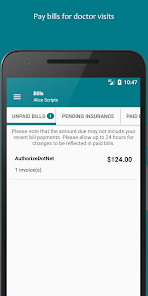
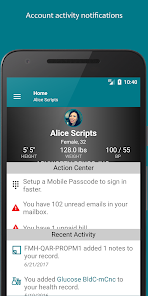
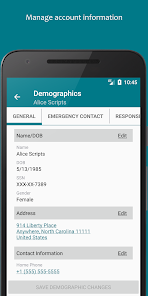
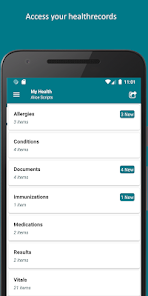
Features & Highlights
FollowMyHealth® is an innovative patient engagement platform that empowers users to take charge of their health and connect seamlessly with healthcare providers. Here are some of its standout features that truly enhance the user experience:
Real Experience Using FollowMyHealth®
Application Scenarios
Using FollowMyHealth® has become an integral part of my daily routine. One typical scenario involves preparing for an annual check-up. I log into the app to review my health records, including my cholesterol levels and blood pressure readings from previous visits. This preparation allows me to engage in a more meaningful conversation with my doctor about my health goals.
Another instance is when I need to manage my medications. I often have to coordinate between different prescriptions. I open the app to check my medication schedule, which helps me plan my day effectively. If I need a refill, I can request it through the app without fussing over phone calls or waiting times.
User Experience
The user interface of FollowMyHealth® is intuitive and user-friendly. Upon logging in, I’m greeted with a clean layout that makes navigation a breeze. Accessing my health records, scheduling appointments, and sending messages to my doctor is all just a few taps away. The app’s performance is commendable; it runs smoothly without lags, and I appreciate the quick loading times for my medical records. Overall, my experience has been overwhelmingly positive. The app not only facilitates healthcare management but also empowers me to be proactive about my health.
Pricing
FollowMyHealth® is free to download and use, which is a significant advantage for patients looking to manage their health without incurring additional costs. While some features may be offered by specific healthcare providers that could incur charges, the app itself provides a wealth of resources at no cost, making it an invaluable tool for many users.
Updates & Support
The app receives regular updates that enhance functionality and user experience. I’ve noticed improvements in navigation and new features that keep the app relevant and user-friendly. Additionally, customer support is readily available; I once had a question regarding my account setup, and the support team responded quickly, providing the assistance I needed without any hassle.
Security & Privacy Review
In today's digital age, security and privacy are paramount, especially for healthcare applications like FollowMyHealth®. The app is available on both the App Store and Google Play, ensuring it adheres to the security standards required by these platforms. Upon registration, the app requires personal information such as your name, date of birth, and email address, which are necessary to create a secure account.
Importantly, FollowMyHealth® does not engage in advertising or tracking behavior that invades user privacy. Instead, it focuses on providing a secure environment for managing personal health information. The app employs encryption protocols to safeguard sensitive data, offering peace of mind for users who may have concerns about the privacy of their health records. Overall, I feel confident using FollowMyHealth® for my healthcare management needs, knowing that my information is protected.

 Access your health records anytime, anywhere. Schedule appointments conveniently from your device. Communicate securely with your healthcare providers. Manage medications and track prescriptions easily. Receive reminders for upcoming appointments and tests.
 Limited compatibility with some healthcare providers User interface can be confusing at times Frequent technical issues disrupt access Customer support response times can be slow
  Google Play
  App Store
 Yes, one of the primary features of FollowMyHealth® is that it allows users to access their medical records. You can view your lab results, medications, immunization history, and other important health information directly through the app. This access enables you to track your health over time and make informed decisions about your care in consultation with your healthcare providers. Keep in mind that the availability of specific records may depend on your healthcare provider's participation in the platform.
Yes, FollowMyHealth® offers a convenient way to schedule appointments with your healthcare provider. You can view available time slots, choose the appointment type, and confirm your booking all through the app. This feature helps streamline the process, making it easier to fit healthcare visits into your busy schedule. Additionally, you may receive reminders for upcoming appointments, reducing the likelihood of missed visits.
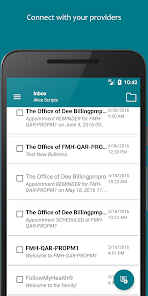
Within FollowMyHealth®, you can easily send messages to your healthcare provider using the secure messaging feature. This allows you to ask questions, request prescription refills, or discuss any concerns without the need for an in-person visit. To contact your provider, navigate to the messaging section within the app, select your provider, and compose your message. You should receive a response within the typical response time set by your healthcare office.
To create an account on FollowMyHealth®, you typically need to visit the official website or download the app from your device's app store. You can sign up by providing some basic personal information, such as your name, email address, and date of birth. If your healthcare provider participates in FollowMyHealth®, you may also need to enter an activation code provided by them. Follow the prompts to complete the registration process, and you will receive a confirmation email to verify your account.
FollowMyHealth® is not universally available for all healthcare providers. Participation in the platform depends on whether your specific healthcare provider or medical facility has adopted the FollowMyHealth® system. To find out if your provider is part of the network, you can check with their office or look for information on the FollowMyHealth® website. If your provider does not participate, you may not be able to use the app to access your records or communicate with them.
You can reach FollowMyHealth® Customer Service by calling their support number or visiting their official website for assistance.
To activate your account, follow the activation link sent to your email after registration, and complete the required information.
To log in, visit the FollowMyHealth® website or app, enter your username and password, then click the "Log In" button.
The Customer Number for FollowMyHealth® can be found on their website or within the app under the support section.