Category: Tools
Developer: Apple
 Verified App


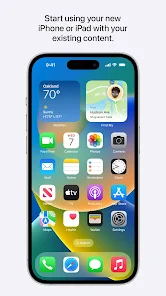
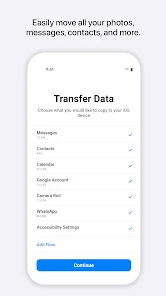
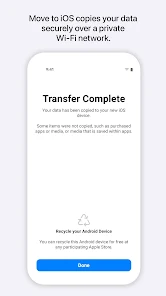
Moving to a new operating system can be a hassle. With all the different apps, data, and settings to bring over, it's easy to feel overwhelmed. However, there is an app that can make your transition much smoother: the Move to iOS app by Apple. The Move to iOS app helps you transfer contacts, photos, messages and more from your Android device to your new iPhone or iPad quickly and securely. In this blog post, we'll discuss how the Move to iOS app works and how it can help you transition from Android to iOS seamlessly.
Features & Highlights
Real Experience Using Move to iOS
Application Scenarios
Switching from Android to iOS can be a significant transition, especially for someone like me who has been an avid Android user for years. When I decided to upgrade to an iPhone, I was a little apprehensive about losing my data and having to start fresh. That's where Move to iOS came in. On the day of my switch, I had my new iPhone ready to go, alongside my old Android device. As I prepared to set up my new phone, I opened the Move to iOS app on my Android device, and it guided me through the steps needed to connect the two devices. It was a seamless experience, and I was able to transfer all my important contacts, messages, photos, and even my calendar events in a matter of minutes. This was particularly helpful as I had an important meeting scheduled the very next day!
User Experience
The user interface of Move to iOS is straightforward and intuitive. Upon launching the app, I was greeted with a friendly welcome screen that outlined the steps I needed to follow. The entire workflow is designed for simplicity; each step is clearly laid out, making it easy to understand what to do next. The performance was impressive as well—my data transfer was completed faster than I anticipated, and I didn't encounter any lags or interruptions. Overall, my feelings after using the app were overwhelmingly positive. Transitioning to a new operating system can be stressful, but Move to iOS made the process incredibly smooth and efficient.
Pricing
One of the best aspects of Move to iOS is that it is completely free. There are no hidden fees or in-app purchases, which is refreshing in today's app ecosystem. For anyone looking to make the switch from Android to iOS, this app provides an invaluable service without costing a dime. Given the amount of data it can help transfer, it truly offers fantastic value.
Updates & Support
Apple regularly updates the Move to iOS app to improve its functionality and address any potential bugs. During my usage, I felt reassured knowing that the app was being actively maintained. Should I have encountered any issues, the support resources provided by Apple are excellent. Their online help center offers comprehensive guides and troubleshooting tips, ensuring users can get assistance if needed. Overall, I felt well-supported throughout my experience.
Security & Privacy Review
As an American user, I have significant concerns about security and privacy when using apps, especially those that handle personal data. Move to iOS is available on both the App Store and Google Play, ensuring that it meets the necessary security standards of these platforms. When using the app, I was required to enter minimal personal information, specifically for the transfer process. This made me feel more secure, knowing that my data wasn't being collected for unnecessary purposes.
Moreover, I did not encounter any ads or intrusive tracking behavior while using Move to iOS. Apple is known for its strong stance on privacy, and this app aligns with that ethos by ensuring that user data is transferred securely without any third-party interference. Overall, I felt confident using Move to iOS, knowing that my information was safe throughout the entire process.

 Seamlessly transfers data from Android to iOS devices Preserves contacts, messages, and photos effortlessly Simplifies your transition to a new iPhone Ensures a secure and private data transfer User-friendly interface makes setup easy for everyone
 Transfer speed can be slow for large data. Limited compatibility with non-Apple devices. Certain apps might not transfer seamlessly. Requires a stable Wi-Fi connection to function.
  Google Play
  App Store

one on one messages all got turned into grouped messages.
Disaster of an app, I left it to transfer all of my data overnight - error... I then transfer small amounts of data, it will say 1 minute left and hours goes by... I resetted my iPhone more than 5 times trying to get this right... This is a horrible app.
it failed to transfer.
stuck after 99% data transfer completed.
The worst app. No matter what you do it will get stuck at 1 minute for hours.
Review Source: Google Play store public user reviews.
Move to iOS does not collect personal data during the transfer process; the data is transferred directly between devices without being sent to Apple servers.
Yes, Move to iOS is completely free to download and use, with no trial period or hidden costs involved.
No, Move to iOS does not require an internet connection for the transfer process, as it creates a private Wi-Fi network between the two devices for data transfer.
You can contact Apple Support for assistance with Move to iOS or provide feedback through the Apple Support website or the Feedback app on your iOS device.
Since Move to iOS does not involve any subscriptions, there is no need to manage or cancel anything related to payments or plans.
No, you do not need to log in to use the Move to iOS app; it works seamlessly without an Apple ID.
You can reach customer service through Apple Support's website or by calling the Apple Support number specific to your region.
The app activates automatically when you select "Move Data from Android" during the iPhone setup process. Follow the on-screen instructions to complete the transfer.
There isn't a specific customer number for Move to iOS; instead, use the general Apple Support numbers available on their website for assistance.
• Faster data migration using a cabled connection between your iPhone and your Android phone (USB-C or USB-C to Lightning)• Connect over WiFi or Personal Hotspot• iOS tips are now displayed during migration• Call history and Dual SIM labels are now migrated• Voice recordings are now migrated to the Voice Memos app or the Files app depending on the file format• New languages supported: Bangla, Gujarati, Kannada, Malayalam, Marathi, Odia, Punjabi, Tamil, Telugu, and Urdu