
 Home
Home  Apps
Apps  Games
Games  Windows
  Terms of Service
  Cookies & Privacy Policy
  About us
Transit: Bus & Subway Times
Version: 5.14.5
Developer: Transit, Inc.
 Verified App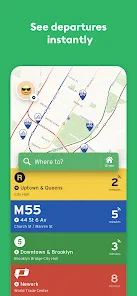
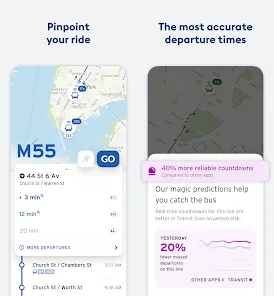
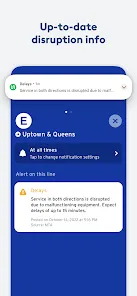
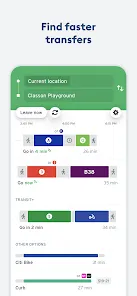
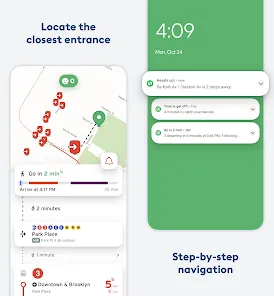

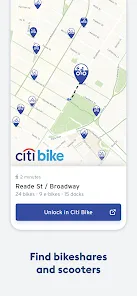
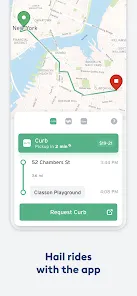
Transit: Bus & Subway Times is a transportation app that provides real-time information on bus and subway schedules and routes. The app covers over 200 cities around the world, including major cities like New York, London, and Paris. Transit: Bus & Subway Times helps users plan their trips by providing information on the nearest bus or subway stop, the arrival times of the next few buses or trains, and the best route to take to get to their destination. The app is available on iOS and Android, and it is free to download and use.
Features & Highlights
Real Experience Using Transit: Bus & Subway Times
Application Scenarios
I first stumbled upon Transit: Bus & Subway Times during my morning commute when my usual bus was running late. Frustrated, I opened the app to check if there were any updates. Much to my relief, the app provided real-time arrival information, which allowed me to decide whether to wait or catch another bus. Since then, I’ve incorporated Transit into my daily routine. Whether I’m heading to work, meeting friends, or exploring the city, this app has become my go-to companion for navigating public transportation.
Another memorable experience happened when I planned a weekend trip to a local festival. I used Transit to map out my entire journey, combining bus routes and a rideshare option. The app’s multi-modal trip planning feature made it super easy to navigate the various transport options, ensuring I arrived on time to enjoy all the festivities.
User Experience
From the moment I launched the Transit app, I was greeted with a sleek and modern interface that felt both friendly and functional. The design is intuitive, making it easy for anyone to navigate—something I truly appreciate. The main screen displays my nearest stops and their arrival times, which is incredibly convenient.
The app's workflow is seamless; I can quickly input my destination and get a variety of route options, complete with estimated travel times. I've noticed that it performs exceptionally well, even during peak hours when other apps tend to lag. My overall feeling after using Transit is one of empowerment—I feel in control of my commute, knowing exactly when to leave and what to expect.
Pricing
Transit: Bus & Subway Times is free to download and use, which is fantastic for anyone looking to enhance their commuting experience without breaking the bank. While there are no hidden fees, the app does offer optional premium features that can enhance your experience, such as personalized alerts. Overall, I find the pricing structure to be user-friendly and accommodating for all types of commuters.
Updates & Support
The app is regularly updated to ensure optimal performance and user satisfaction. I’ve noticed improvements in speed and additional features with recent updates, which is commendable. Moreover, the support team is responsive and helpful. I had a minor issue with location tracking once, and their customer service was quick to assist, making the experience even better. The commitment to customer support adds a layer of trust that I appreciate as a user.
Security & Privacy Review
As an American user, I take security and privacy seriously, especially with apps that rely on location data. Transit: Bus & Subway Times is sourced from reputable platforms like the App Store and Google Play, ensuring that it meets standard security protocols.
The app does require some personal data for registration, such as location access to provide real-time transit updates. However, it’s worth noting that the app is transparent about what data it collects and how it is used, which I find reassuring. I also appreciate that there are minimal ads, and the app does not engage in excessive tracking behavior, allowing me to use it without feeling overwhelmed by intrusive marketing tactics. Overall, Transit strikes a balance between functionality and user privacy, making it a reliable tool for my commuting needs.
Pros 
-
 Stay informed with real-time updates
 - Easily plan your route with ease
- Find nearby stations quickly
- Access schedules for multiple cities
- User-friendly interface for all
Cons 
-
 Limited coverage in suburbs
 - Slow updates during delays
- Occasionally inaccurate times
- User interface can be cluttered
 Google Play
  App Store
 FAQ
1
Can I submit suggestions or feedback to Transit: Bus & Subway Times?
Yes, users can submit suggestions or feedback directly through the app or via their official website to help improve the service.
2
Does Transit: Bus & Subway Times collect my personal data?
Transit collects minimal personal data to enhance user experience but adheres to privacy regulations to protect your information.
3
Does Transit: Bus & Subway Times support offline use?
Yes, Transit offers limited offline functionality, allowing users to access previously loaded schedules and routes without an internet connection.
4
How do I cancel my Transit: Bus & Subway Times subscription?
To cancel your subscription, go to your app store settings and manage subscriptions from there. Follow the prompts to cancel.
5
How much does a subscription to Transit: Bus & Subway Times cost?
Transit offers a free version, but some premium features may require a subscription, typically ranging around $5/month. Check the app for details.
How to use Transit: Bus & Subway Times
1
Can I access the app without creating an account?
Yes, you can use many features of the app without creating an account, but signing up offers additional benefits.
2
How can I update my payment information for the Transit app?
Go to your account settings in the app to update your payment information securely.
3
How do I log in to the Transit app?
Simply open the app and tap on the login option to enter your credentials or sign up for a new account.
4
How do I reset my password for the Transit app?
Tap the "Forgot Password?" link on the login screen to receive instructions via email.
5
Is there a way to activate premium features in the Transit app?
You can activate premium features by subscribing through the app's settings or account section.
Top Apps











Similar Apps

Live Earth Map: GPS Satellite
Az Game Inc


JOLT Electric Vehicle Charging
Jolt Charge Developer
1.3

GPS Map Cam: Phone Tracker
Amobear Application Publishing
3.9

GOHUNT / Hunt Research & Maps
goHUNT LLC
3.7
Boat Beacon - AIS Navigation
Electric Pocket
3.3

Street View Earth Map Live GPS
Orsys llc
4.3
Phone Locator: Family Location
WeFindertools
4.3

Trucker Guide: Truck GPS Maps
Trucker Guide
4.4

NZ Topo50 Offline - South
Right Place Resources
4.6

Live Earth Map: GPS Navigation
Bestify
NextBus
1

بلد - مسیریاب، نقشه - Balad
Balad maps
4.3


