
Category: Shopping
Developer: Harbor Freight Tools USA, Inc.
 Verified App


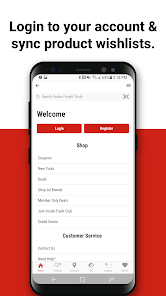
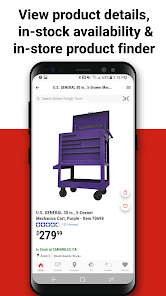
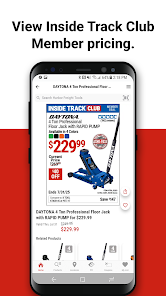
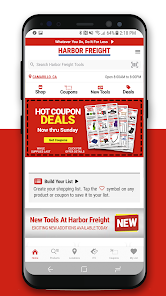
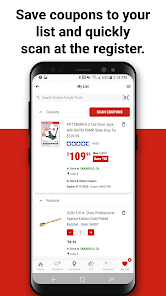
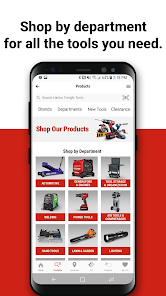
Harbor Freight is a discount tools and equipment retailer that has been in business since 1977. The company operates over 800 stores in the United States and is headquartered in California. Harbor Freight sells its own private label products, as well as products from other brands.The Harbor Freight Tools app is a free app that gives users access to Harbor Freight's weekly ad, coupons, store locator, and product catalog. The app also allows users to create a shopping list and track their order history.
Features & Highlights
The Harbor Freight Tools app brings the hardware store right to your fingertips, making it an essential tool for DIY enthusiasts and professionals alike. With its user-friendly interface and a wealth of features, this app is designed to streamline your shopping experience. Here are some key highlights:
Real Experience Using Harbor Freight Tools
Application Scenarios
As someone who frequently engages in DIY projects, the Harbor Freight Tools app has become my go-to resource. Recently, I decided to tackle a fence-building project in my backyard. Using the app, I was able to scout for the best lumber, tools, and hardware without stepping foot outside my home. Another instance was when I needed a specific drill bit for a last-minute repair; rather than wandering through aisles at a hardware store, I quickly checked the app to confirm availability at a nearby location, saving me both time and frustration.
User Experience
The user interface of the Harbor Freight Tools app is intuitive and easy to navigate. Upon opening the app, I am greeted with a clean design and a straightforward layout, making it simple to find what I need. The search functionality works flawlessly, allowing me to filter by category or even price range. I was particularly impressed with the speed of the app; it loaded product pages quickly, which is crucial when I’m in a hurry. Overall, my experience has been positive, and I genuinely appreciate the effort put into making it user-friendly.
Pricing
One of the standout features of the Harbor Freight Tools app is its competitive pricing. The app frequently updates with sales and discounts, making it easy to find bargains on high-quality tools. I often take advantage of the weekly deals, which can save me anywhere from 20% to 50% on essential items. The pricing transparency also helps me make informed decisions without the fear of hidden fees or extra costs.
Updates & Support
Harbor Freight Tools consistently rolls out updates to improve functionality and user experience. I’ve noticed enhanced features being added regularly, including better product recommendations and smoother navigation. Customer support is also readily available through the app, should I encounter any issues. They offer a dedicated help section, making it easy to find answers to common questions or reach out for assistance when needed.
Security & Privacy Review
When it comes to security and privacy, the Harbor Freight Tools app takes significant measures to protect its users. Available on both the App Store and Google Play, it adheres to the standard security protocols expected from reputable applications. During the registration process, I was required to provide minimal personal information, ensuring that my data remained secure. The app has a clear privacy policy, detailing how my data is used, which I found reassuring.
Additionally, I’ve noticed that the app does not bombard me with excessive ads or tracking behavior. While it does utilize some forms of targeted advertising, it does so in a way that feels respectful of my privacy. Overall, I feel confident using the Harbor Freight Tools app, knowing that my information is safeguarded while I shop for my next project.

 Wide variety of tools for every project Competitive pricing for budget-conscious shoppers Frequent sales and discounts maximize savings Quality products backed by solid warranties Convenient locations for easy access
 Quality can be inconsistent across different products Customer service can be lacking in responsiveness Limited warranty options compared to competitors Tools may not withstand heavy professional use
It's handy to create a shopping list so you don't forget anything.
love the app and all the friendly staff at your store

the very first page, with a next button that must be touched, puts said button at the very bottom of the screen. it cannot be touched on an android samsung galaxy because the button is behind the android navigation (back, home app manager) buttons. Only catching very left edge after several tries. Developer might be able to add a little margin at the bottom of first launch screen. Rest of app seems to work fine/ able to reach bottom items on pages.
search doesn't work
it sucks its not user friendly at all can't even get it to make a payment on my card
Review Source: Google Play store public user reviews.
Yes, the Harbor Freight Tools app may collect personal data such as location information, purchase history, and preferences to enhance user experience and provide personalized offers.
The Harbor Freight Tools app is free to download and use, and it does not require a subscription or trial period to access its features.
Yes, an internet connection is required to access the Harbor Freight Tools app, as it pulls real-time data for product information, promotions, and store updates.
Users can contact support or send feedback through the app's settings or help section, or by visiting the Harbor Freight website for additional support options.
Since there are no subscription plans associated with the Harbor Freight Tools app, there is no need to manage or cancel a subscription. Users can simply uninstall the app if they choose to stop using it.
You can reach Harbor Freight's Customer Service through the app's "Help" section or by calling their toll-free number found on their website.
To activate your account, simply complete the registration process and confirm your email address through the link sent to you.
Your Customer Number can be found in your account settings within the app after logging in.
Use the "Forgot Password" option on the login screen to reset your credentials via email.
The latest version contains bug fixes and performance improvements.

Amazon Shopping

Etsy: Shop & Gift with Style
Etsy: Buy & Sell Unique Items

Costco Wholesale

Vinted: Buy & sell preloved

OfferUp: Buy. Sell. Simple.
OfferUp: Buy. Sell. Letgo.

Dollar General

Affirm: Buy now, pay over time
Affirm: Buy now, pay over time App

Klarna | Shop now. Pay later.

Circle K
 Google Play
  App Store