
Version: 0.82.2
Developer: SimplyWise
 Verified App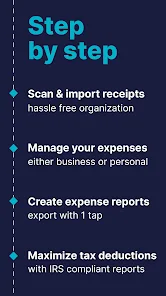


Features & Highlights
Real Experience Using SimplyWise: Receipts, Expenses
Application Scenarios
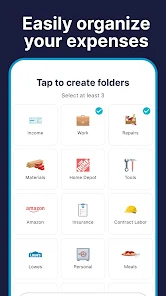
As someone who juggles multiple roles, from a busy professional to an occasional freelancer, I find SimplyWise to be an invaluable tool for managing my finances. One scenario where the app shines is during my frequent work-related travel. Before heading to a conference, I set up categories for travel expenses, meals, and entertainment. As I collected receipts, I effortlessly scanned each one into the app, ensuring that I had a complete record of my expenses. This not only streamlined my reimbursement process but also kept my budget in check.
Another situation where SimplyWise comes in handy is during monthly budgeting sessions. I often sit down with my partner to review our spending, and SimplyWise allows me to pull up categorized data quickly. This simplifies our discussions and helps us make informed decisions about where we can cut back, such as dining out too often or unnecessary subscriptions.
User Experience
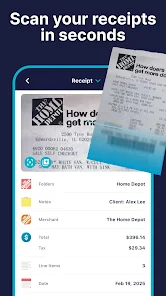
The user interface of SimplyWise is remarkably intuitive. Upon opening the app, I’m greeted with a clean, organized dashboard that shows my total expenses and categories at a glance. The workflow for scanning receipts is seamless; I simply click the camera icon, take a picture, and watch as the app does the rest. It's like having a personal assistant who’s always ready to help with my financial documentation.
Performance-wise, I’ve experienced minimal lag, even when uploading multiple receipts at once. The app’s responsiveness makes the task of managing finances feel less daunting. After a few weeks of using SimplyWise, my overall feeling is one of satisfaction; it has made my financial tracking less cumbersome and more engaging. I find myself checking my expenses regularly, which was something I avoided in the past.
Pricing
SimplyWise offers a free version that provides basic functionalities, which is a great starting point for users who want to test the waters. For those seeking advanced features, such as unlimited receipt scans and enhanced export options, the premium version is available at a reasonable monthly or yearly subscription. I opted for the premium version after a month of use because the added features significantly enhance my financial management experience.
Updates & Support
One of the app's standout features is its commitment to regular updates. SimplyWise frequently rolls out new features based on user feedback, which I appreciate. Whenever I encounter an issue, their customer support is responsive and helpful. I reached out once regarding a scanning glitch, and their team swiftly resolved the problem with a detailed follow-up. This level of support gives me confidence in continuing to use the app.
Security & Privacy Review
When it comes to security and privacy, SimplyWise takes important steps to protect user data, which is crucial for American users concerned about their financial information. The app is available on both the App Store and Google Play, which means it adheres to strict guidelines set by these platforms to protect user information.
During registration, SimplyWise requires basic personal data, but it does not ask for sensitive information like Social Security numbers or bank account details, which is a relief. The app is transparent about its data usage policies, assuring users that their information is not sold to third parties. Additionally, I have not encountered any intrusive ads or excessive tracking behavior while using the app, which enhances my overall sense of security while managing my finances. This focus on privacy allows me to use the app confidently, knowing my data is safe and sound.

 Easily scan and store receipts digitally Track expenses effortlessly in real-time Generate detailed expense reports instantly Set budget limits and monitor spending Access financial insights anytime, anywhere
 Limited features for comprehensive expense tracking User interface can be confusing for new users Reliance on manual entry increases error risk Customer support response times may be slow
  Google Play
  App Store
 Yes, SimplyWise offers multi-device support, allowing you to log in and access your account from different devices. Your data will sync across all devices, ensuring you have up-to-date information at all times.
Yes, SimplyWise allows users to categorize their expenses. You can create custom categories or choose from predefined ones to help better organize your financial data and gain insights into your spending habits.
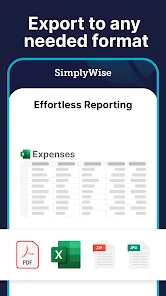
Yes, SimplyWise allows users to export their financial data in various formats, such as CSV or PDF. This feature is useful for sharing information with accountants or for personal record-keeping.
Yes, SimplyWise provides various reporting features that allow users to generate insights into their spending patterns. You can view reports by categories, time periods, and other customizable parameters to better understand your financial habits.
Yes, SimplyWise supports multiple currencies, making it suitable for users who travel frequently or conduct transactions in different currencies. You can easily switch between currencies within the app.
Your customer number can be found in your account settings under the profile section in the app.
You can contact SimplyWise customer service through the app's support section or visit their official website for assistance.
Open the app and enter your registered email and password, then tap the "Log In" button.
To activate SimplyWise, download the app, create an account, and follow the on-screen prompts to complete the activation.